 .Buildings.Fluid.HeatPumps.ModularReversible.RefrigerantCycle.BaseClasses.TableData2DLoadDep .Buildings.Fluid.HeatPumps.ModularReversible.RefrigerantCycle.BaseClasses.TableData2DLoadDep
This block implements two core features for some chiller and heat pump models within Buildings.Fluid.HeatPumps.ModularReversible and Buildings.Fluid.Chillers.ModularReversible.
PLR to meet the load, within
system capacity.1yMea provided as input.21 The part load ratio is defined as the ratio of the
actual heating (or cooling) heat flow rate to the maximum capacity
of the heat pump (or chiller) at the given load-side and
ambient-side fluid temperatures. It is dimensionless and bounded by
0 and max(PLRSup), where the upper bound
is typically equal to 1 (unless there are some
capacity margins at design conditions that need to be accounted
for). In this block, the part load ratio is used as a proxy
variable for the actual capacity modulation observable. For systems
with VFDs, this is the compressor speed. For systems with on/off
compressors, this is the capacity of the enabled compressors
divided by the total capacity. When meeting the load by cycling on
and off a single compressor, this is the time fraction the
compressor is enabled. In all cases, the algorithm assumes
continuous operation and only approximates the performance on a
time average. Finally, note that while the part load ratio is used
for generalization purposes, either the part load ratio or the
actual capacity modulation observable (e.g., the normalized
compressor speed) may be used to map the performance data. The only
requirement is that this variable be normalized, as the algorithm
assumes it equals 1 at design (selection)
conditions.
2 The reason why the part load ratio is both
calculated (PLR) and exposed as an input
(yMea) is to allow for modeling internal safeties that
can limit operation. If no safeties are modeled, a direct feedback
of PLR to yMea can be used.
When the machine is enabled (input signal on is
true) the capacity and power are calculated by partitioning the PLR
values into three domains, as illustrated in Figure 1.
TLoa, TAmb,
min(PLRSup). This domain may not exist if the
parameter PLRCyc_min is equal to
min(PLRSup), which is the default setting.0 and the
value at TLoa, TAmb,
min(PLRSup), while the power is linearly interpolated
between P_min and the value at TLoa,
TAmb, min(PLRSup), where
P_min corresponds to the remaining power when the
machine is enabled and all compressors are disabled.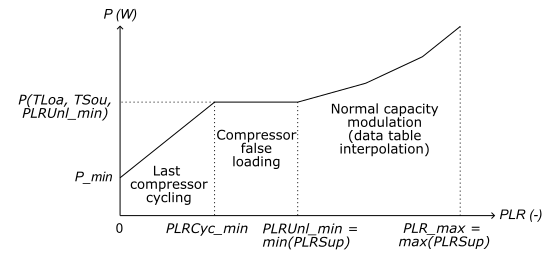
Figure 1. Input power as a function of the part load ratio.
The performance data are read from an external ASCII file that must meet the requirements specified in the documentation of Modelica.Blocks.Tables.CombiTable2Ds.
In addition, this file must contain at least two 2D-tables that
provide the maximum heating (resp. minimum cooling) heat flow rate
and the input power of the heat pump (resp. chiller) at
100 % PLR. Each row of these tables corresponds to a
value of the load-side fluid temperature, each column corresponds
to a value of the ambient-side fluid temperature. This could be
either the leaving temperature if use_T*OutForTab is
true, or the entering temperature if use_T*OutForTab
is false. The load and ambient temperatures must cover the whole
operating domain, knowing that the model only performs
interpolation and no extrapolation of the capacity and power along
these variables.
The table providing the capacity values must be named
q@X.XX where X.XX is the PLR value
formatted with exactly 2 decimal places ("%.2f").
Similarly, the table providing the power values must be named
p@X.XX.
Here is an example of chiller data ("-----" is not part of the file content):
-----------------------------------------------------
#1
double q@1.00(5,5)                    # Cooling heat flow rate at 100 % PLR
0 292.0 297.4 302.8 308.2             # CW temperatures as column headers
280.4 -493241 -555900 -495611 -312372 # Each row provides the capacity at a given CHW temperature
282.2 -470560 -578165 -562822 -424529
284.1 -418413 -573462 -605561 -514711
285.9 -342290 -542284 -619329 -573426
double p@1.00(5, 5)                   # Input power at 100 % PLR
0 292.0 297.4 302.8 308.2             # CW temperatures as column headers
280.4 60430 80413 80830 55530         # Each row provides the input power at a given CHW temperature
282.2 54399 80278 89151 73950
284.1 45251 76017 92822 87633
285.9 34546 68567 91833 95401
-----------------------------------------------------
In addition, for machines that have capacity modulation other
than cycling on and off a single compressor, the whole range of
normal capacity modulation must be covered by providing
similar 2D-tables at different PLR values. The lowest PLR value
will be considered as the minimum PLR value before false loading
the compressor. If the machine has no hot gas bypass
(PLRCyc_min = min(PLRSup)) this will correspond to the
minimum PLR value before cycling the last operating compressor.
All the PLR values used in the performance data file must be
specified in the array parameter PLRSup[:].
Compressor cycling is not explicitly modeled. Instead, the model
assumes continuous operation from 0 to
max(PLRSup). The only effect of cycling taken into
account is the impact of the remaining power P_min
when the machine is enabled and the last operating compressor is
cycled off. Studies on chillers and heat pumps show that this is
the main driver of efficiency loss due to cycling (Rivière, 2004).
When a compressor is staged on, energy losses occur due to the
overcoming of the refrigerant pressure equalization and the heat
exchanger temperature conditioning. However, a large part of these
losses is recovered when staging off the compressor, unless the
machine is disconnected from the load when compressors are
disabled. This disconnection does not happen when staging multiple
compressors, and the research shows no significant performance
degradation when a chiller cycles between different stages without
completely shutting down. And even when disabling the last
operating compressor, most plant controls require continuous
operation of the primary pumps when the chillers or heat pumps are
enabled. The European Standard for performance rating of chillers
and heat pumps at part load conditions (CEN, 2022) states that the
performance degradation due to the pressure equalization effect
when the unit restarts can be considered as negligible for hydronic
systems. The only effect that will impact the coefficient of
performance when cycling is the remaining power input when the
compressor is switching off. If this remaining power is not
measured, the Standard prescribes a default value of
10 % of the effective power input measured during
continuous operation at part load.
Heat recovery chillers can be modeled with this block. In this case, the same chiller performance data file is used for both cooling and heating operation. The model assumes that all dissipated heat from the compressor is recovered by the refrigerant. This assumption enables computing the heating capacity as the sum of the cooling capacity and the input power.
When configured to represent a heat recovery chiller, this block
uses an additional input connector coo which must be
true when cooling mode is enabled, and false when heating mode is
enabled. The load side input variables must externally be connected
to the evaporator side variables in cooling mode, and to the
condenser side variables in heating mode. The output connector
Q_flow is always the cooling heat flow rate,
whatever the operating mode. The heating heat flow rate in heating
mode can be computed externally as P-Q_flow.
The block implements ideal controls by solving for the part load ratio required to meet the load (more precisely the minimum between the load and the actual capacity for the current load and ambient temperatures). This is done by interpolating the PLR values along the heat flow rate values for a given load.
The load is calculated based on the load side variables and the
temperature setpoint provided as inputs. The setpoint either
represents a leaving (supply) temperature setpoint if
use_TLoaLvgForCtl is true (default setting) or the
entering (return) temperature if use_TLoaLvgForCtl is
false.
The required PLR value is returned as an output while the actual
heat flow rate and power are calculated using the PLR value
yMea provided as input, which allows limiting the
required PLR to account for equipment internal safeties.
| Name | Description |
|---|---|
 TypeOfSystem TypeOfSystem |